Building Easy Review Environments with Podman Quadlets
During code reviews, the functionality has to be tested as well. This can be done slowly by checking out the code and running it, or quickly by having a containerized review environment ready alongside the merge request. Most companies default to Kubernetes for this task. We found something simpler.

We needed a fast and easy way to test out newest changes in our containerised apps. Our three requirements were:
easy maintenance
automatic spin up/down
reachable with a separate URL
For this we have found a way with Podman and Nginx.
We considered Kubernetes but decided against it because it's known for quite a steep learning curve, heavy maintenance, and a time-consuming initial setup which can take a few hours up to a few days. All of this consumes a lot of precious time in a day's work. This is why we opted for Podman instead. It is already being used in our team, simpler to use and maintain, completely hands-off and substantially lighter as well.
Overview of the Architecture
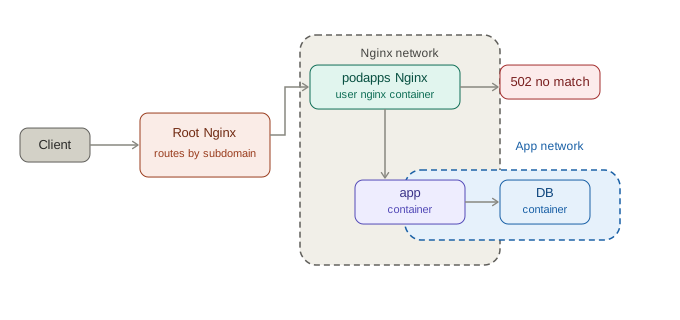
The client sends a request to the root Nginx, which does TLS termination and is proxying, based on the suffix of the subdomain, to the respective user Nginx container. This container is in a Podman network with all containers meant for public access. To route the request to the correct review environment, we make use of the internal DNS which is included in Podman networks. To have a reproducible setup, all of those containers get managed by quadlets.
But what is a Quadlet ?
A feature of Podman is the so called quadlet. Introduced in the stable release on 1 February 2023, it replaces the now deprecated command podman generate systemd. Quadlets are declarative files used together with the podman-system-generator which generates systemd.service files.A quadlet is a file, which in its structure is similar looking to a systemd unit-file, with the extensions of .build, .container, .image, .kube, .network, .pod or .volume. Like usual, you can define dependencies etc. in the [Unit] section. Each of the files contains a section which is identical to the extension (in case of .image [Image], or with .container [Container], etc.). In those sections you set arguments as usual when making a podman run command or similar.
The first Challenge - Routing the Request
An essential feature in our internal deployment was the ease of accessing the containers. This is used so we can set up a GitLab environment for every project which requires or would benefit from one. To make this happen easily and without having to edit more files we use multiple instances of Nginx, bare-metal and containerised together with the Podman network DNS. We set the hostnames of the containers in the quadlets to the domain from which it should be accessed from. An example for this is https://myapp-podapps.smoca.ch. This request gets to the root Nginx which redirects it based on the podapps.smoca.ch suffix, to the podapps Nginx container. This container then proxies the request again but this time to the container with the hostname myapp-podapps.smoca.ch. Important to note is: should no container with the respective hostname be found on the Podman network, the 502 Bad Gateway response will be returned.
Our Nginx configs for the userspace containers look like this:
events { worker_connections 1024; }
error_log  /dev/stdout debug;

http {
    map $http_upgrade $connection_upgrade {
        default upgrade; '' close;
    }

    map $http_host $valid_host {
        default "";
        ~^(?<subdomain>[a-z0-9]([a-z0-9-]*[a-z0-9])?)-podapps\.smoca\.ch$ $http_host;
    }

    access_log /dev/stdout;

    resolver 10.10.0.1 valid=5s ipv6=off;
    server {
        listen 8300;
        server_name _;

	    real_ip_header    X-Forwarded-For;
        set_real_ip_from  10.10.0.0/16;

        location / {
            if ($valid_host = "") {
                return 400 "Invalid host";
            }

            proxy_pass http://$valid_host:3000;
            proxy_http_version 1.1;
            proxy_set_header Host $http_host;
            proxy_set_header Upgrade $http_upgrade;
            proxy_set_header Connection $connection_upgrade;
            proxy_set_header X-Real-IP $remote_addr;
            proxy_set_header X-Forwarded-For "$http_x_forwarded_for, $realip_remote_addr";
        }
    }
}
The second Challenge - Creating the Quadlets
For creating the quadlets in the pipeline we created a simple script which creates .container files and other things like .network files as needed. Those files get rsynced into the ~/.config/containers/systemd/ folder on the server. An example for such a quadlet could look like this:
[Unit]
Description=myapp backend container for $CI_COMMIT_REF_SLUG
Requires=myapp-db-$CI_COMMIT_REF_SLUG.container
After=myapp-db-$CI_COMMIT_REF_SLUG.container

[Container]
Image=$CI_REGISTRY_IMAGE:$CI_COMMIT_REF_SLUG
HostName=myapp-$CI_COMMIT_REF_SLUG-podapps.smoca.ch
Network=myapp-$CI_COMMIT_REF_SLUG.network
Network=deployuser.network
AutoUpdate=registry
Environment=DATABASE_URL=postgis://myapp:${CI_DB_PASSWORD}@myapp-db-$CI_COMMIT_REF_SLUG:5432/myapp_production
Environment=SECRET_KEY_BASE=$(openssl rand -hex 64)
Environment=RAILS_SERVE_STATIC_FILES=true
Environment=LOG_LEVEL=debug
Environment=SEED_DB=true

[Service]
Restart=always
RestartSec=2
RestartSteps=2
RestartMaxDelaySec=32

${INSTALL}
The special part you can see is the install variable. To start the container we set it to
[Install]
WantedBy=default.target
and to stop it, we set it to an empty string. When we run the systemctl --user isolate default.target the containers which are still running and not needed anymore, will now get stopped due to the missing WantedBy=default.target.
The last and most difficult Challenge - Updating the containers on change of their .container files
This quite simple sounding problem certainly gave me a bigger headache than the other two combined. First we had to find a way to perform the desired action on the containers with a script. With systemctl --user daemon-reload the podman-system-generator generates the new systemd.service files from the declarative quadlets. To actually start/stop the containers we use systemctl --user isolate default.target which stops all services that are NOT WantedBy=default.target and starts all stopped services which are wanted by default.target.
Please be very cautious with that command, since it will stop all systemd services which are not part of default.target. This is especially dangerous if you have more things than just quadlets running on your system. Ideally check first with systemctl --user list-dependencies default.target.
The last step we did is running the podman-auto-update service. This ensures containers will get updated if there is a newer build available.
To automate this three step process we use a systemd.path unit.
[Unit]
Description=Watches .config/containers/systemd for changes
StartLimitIntervalSec=0

[Path]
PathChanged=/home/deploy/.config/containers/systemd
MakeDirectory=false

[Install]
WantedBy=default.target
This specific type of unit file can be used to run a service when it detects a change on the specified path. If you have multiple quadlets which update very close together this might not work, since the path unit can't trigger again when the corresponding service is already running. To solve this in the most idiomatic way, we used a timer as debounce:
[Unit]
Description=Tiny service to restart a timer. Triggered by a path watcher unit

[Service]
Type=oneshot
ExecStart=/usr/bin/systemctl --user restart wait-5-seconds-reload-isolate-update.timer
which in turn starts a timer
[Unit]
Description=A timer which waits 5 seconds and then triggers a systemctl reload isolate default and podman update service systemd service unit

[Timer]
OnActiveSec=5
Unit=reload-isolate-update-container.service
which just waits five seconds. If the path watcher gets fired again within those five seconds it restarts the timer which resets it. If the timer finishes, it will run the service
[Unit]
Description=Log trigger timestamp

[Service]
Type=oneshot
ExecStart=/usr/bin/systemctl --user daemon-reload
ExecStart=/usr/bin/systemctl --user isolate default.target
ExecStart=/usr/bin/systemctl --user start podman-auto-update.service
which finally runs the three commands we discussed above.
Summary
For a lot of things Kubernetes surely is great. For internal testing with virtually no maintenance to the used system maybe not so much. The use of Podman makes things a lot simpler and easier to remember. The most important things are:
setup root Nginx which routes based on URL suffix
setup containerised userspace Nginx which routes based on hostname
create the quadlets needed
set the hostname to the desired URL
put them in the same Podman network as the userspace containerised nginx
setup services to automatically run following commands on file change
systemctl --user daemon-reloadsystemctl --user isolate default.targetsystemctl --user start podman-auto-update.service

